Overview
Persistence Behavior plays an important role in Initial Access and Execution stages because it assists malicious programs in remaining active for a long time, thus leading to create a backdoor for threat actor without detection.
Some targets you would like to gain knowledge:
- Long-term access : Persistence literally enables attackers to maintain long-term access even if surviving system reboots, credential changes, or software patched
- Decreasing detectability : Several persistence techniques abuse the legitimate Operating System features to conceal malware.
- Aids Lateral Movement : remain persistence to help the attacker keep activity, although an endpoint is entirely detected and removed.
- Increase difficulty for remediation : Because of the diversity and complexity of many persistence techniques, it makes systems harder to clean completely.
In attack chain :
In MITRE ATT&CK model, persistence(TA0003) is usually set up after Initial Access stage and before some stages as Priviledge Escalation, Defense Evasion, or Lateral Movement. For instance, Boot or Logon Autostart Execution (T1547) has risen from at or near the bottom of the list in previous years to Rank #7 in the 2026 report
Persistence Technique (T1547.001)
Windows is an ideal environment that threat actor can abuse to develop the malware because of the auto start functionality.
Registry key
The adversary may gain persistence by taking advantage of modifying registry because of the most popular technique, some run keys are usually abused as :
- HKEY_CURRENT_USER\SOFTWARE\Microsoft\Windows\CurrentVersion\Run
- HKEY_CURRENT_USER\SOFTWARE\Microsoft\Windows\CurrentVersion\RunOnce
- HKEY_LOCAL_MACHINE\SOFTWARE\Microsoft\Windows\CurrentVersion\Run
- HKEY_LOCAL_MACHINE\Software\Microsoft\Windows\CurrentVersion\RunOnce
While these mechanism of them are :
-
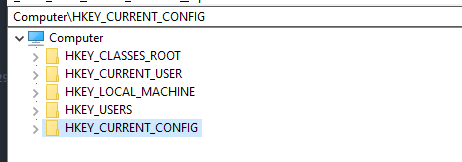
RootKey : The window registry divide into 5 top-level sections.Each of those keys servers a paritular purpose.
-
SubKey : is like a folder within folder.

-
Key : A key is a folder in the registry that can contain additional folders or values.
-
Value entry : A value entry is an ordered pair with a name and value.

-
Value or data : Data stored in a registry key.
Some attackers usually use native tools as reg.exe, regini.exe,mshta.exe,cscript.exe or inline VBScript through rundll32 in order to write those entries.
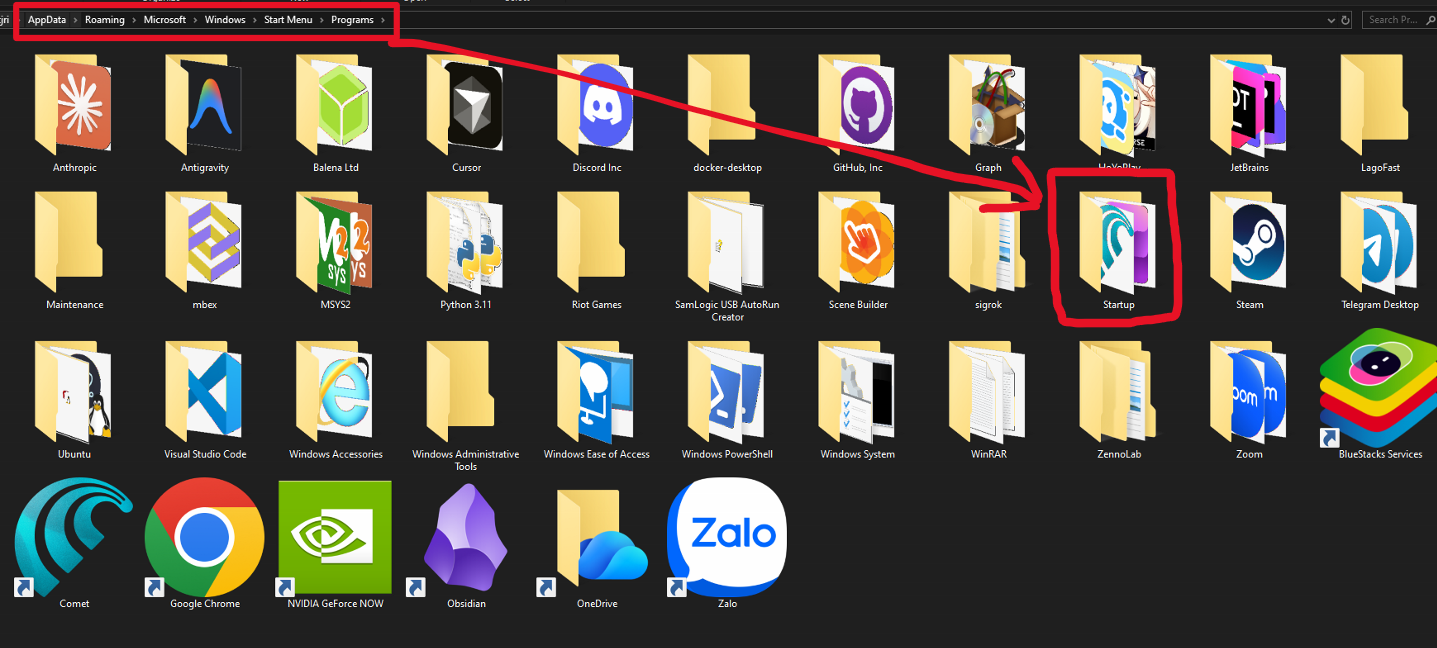
Startup Folder
Additionally, the threat actor might achieve persistence by adding a startup folder, also in which is been setting an run keys, thus leading to execute automatically whenever the user logs on to window.
Schedule Task
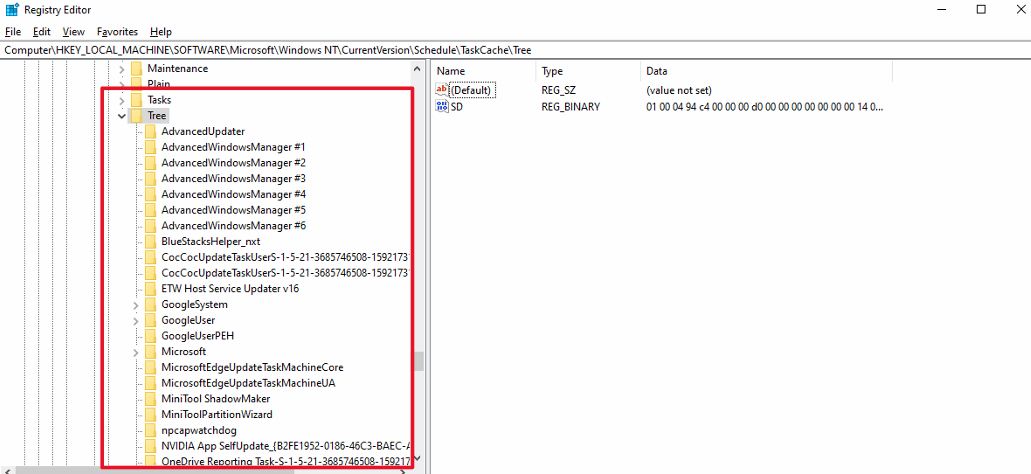
Schedule task is a feature of the Windows OS which can allow the program to execute automatically or scripts at specified intervals.
Malware can take advantage of this feature to establish persistence on a system by creating a new scheduling task that runs the malicious program. These tasks are stored in registry at HKEY_LOCAL_MACHINE\SOFTWARE\Microsoft\Windows NT\CurrentVersion\Schedule\TaskCache\Tree. Sometimes, this technique use fileless execution with Powershell.
Windows Service
Installing the malware as a windows service runs consecutively with SYSTEM permission without needing user to logon. This technique is usually abused by RAT (Remote Access Trojan) or backdoor which target is enterprise.
WMI Event Subscription (T1546.003)
Basically, WMI is not only a system for management data and operations on Windows-based operating systems, but also the best evasion technique which several malwares usually abuse.
Threat actors make 3 components of object. First one is EventFilter that uses to define trigger event. Next, they abuse EventConsumer to make necessary action. Last but not least, to associate with two-parts.
WMI Persistence Flow:
EventFilter (trigger: user login / startup)
    → FilterToConsumerBinding
        → EventConsumer (execute malicious script/binary)
The dangerous technique is a payload stored totally in WMI database, there is no file created on disk and execute with SYSTEM privilege through WmiPrvSe.exe. The Detection requires sysmon and EventID 19 (Eventfiler creation), 20 (EventConsumer creaation), 21 (FilterToConsumerBinding).
Fileless Malware
Fileless Malware is a technique that leverages legitimate Windows tools to execute.It’s particularly dangerous because, instead of storing malicious file on the hard-disk, it operates entirely in-memory (RAM). This approach resembles the LOLbins technique as :
- Registry-based script storage : Storing Powershell payload in registry key, after that, it is executed by
wscript.exeandpowershell.exe. - WMI event Subscription : Saving script in
WMI database, there is no file created. - COM Object Hijacking : Replace legitimate COM object with payload.
- Scheduled Task with inline Powershell: Task does not point to file that stores internal script.
APT real-scenario
CosmicStrand(2016-2022)
CosmicStrand, a sophisticated UEFI firmware rootkit , has been developed by a Chinese APT group since 2022. Malware is found in motherboard firmware of Gigabyte and ASUS, it hooks into CSMCORE DXE driver to inject kernel-level implant every startup. It is the most persistent level because there is no way to remove it by formatting or re-installing the OS.
APT 2024 – 2025 campaign (ESET)
The ESET APT Activity has reported that :
- Sednit(APT28) : Exploited zero-day vulnerability in MDaemon Email Server (CVE-2024-11182) which the Ukraine country is a target.
- RomCom : Deployed zero-day on Mozilla Firefox and Windows.
- Sandworm : Launched wiper ZEROLOT through Active Directory Group Policy.
Practical Program (Only for learning)
START PROGRAM:
    // Step 1: Initialize Registry Metadata
    CREATE Instance KeyInformation (Type: HkeyPersis)
    SET KeyInformation.hkey = HKEY_CURRENT_USER
    SET KeyInformation.subkey = "SOFTWARE\Microsoft\Windows\CurrentVersion\Run"

    VARIABLE MainHkey = NULL

    // Step 2: Open/Modify the Registry Key
    CALL OpenRegistryKey(KeyInformation.hkey, KeyInformation.subkey) STORE RESULT IN res

    IF (res IS SUCCESSFUL) THEN:
        SET payload = "C:\Users\Kat\Desktop\LearnMal\Injection\DLLinjection.exe"
        SET payload_length = CalculateLength(payload) + 1

        // Write the path of the malicious file to the Run key
        CALL SetRegistryValue(
            Handle: MainHkey,
            Name: "notepad",
            Type: REG_SZ,
            Data: payload,
            Size: payload_length
        )

        CALL CloseRegistryKey(MainHkey)
    END IF

    // Step 3: Trigger System Executable (UAC Bypass Vector)
    INITIALIZE ShellExecuteInfo STRUCTURE:
        .Verb = "runas" (Request Admin elevation)
        .File = "C:\Windows\System32\fodhelper.exe"
        .ShowCommand = SW_NORMAL (Visible window)

    CALL ExecuteSystemFile(ShellExecuteInfo)

END PROGRAM.
Inconclusion
Malware Persistence is one of several complex and the most dangerous technique in current Cyber Security generation. From simple technique as Registry Run Keys or Cron Jobs to sophisticated as UEFI Bootkit and BYOVD, threat actors always expand the weapon day by day. In this day and age, fileless persistence, AI-enhanced malware make the detection more hard.
Thanks for reading. If you have any troubles, please do not hesitate to contact my email.