Bypass UAC Technique 101 on Window Operating
Overview
User Account Control (UAC) plays a crucial key on Windows security. UAC reduces the risk of malware by limiting the ability of malicious code to execute and get the privilige escalation.
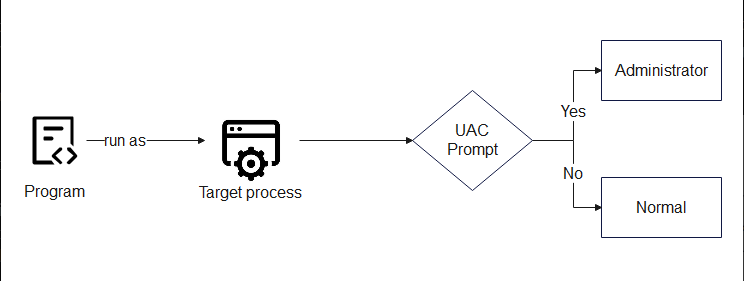
Pay attention that Microsoft does not consider this technique as security vulnerabilities, but rather as a method of bypassing a “defense-in-depth” feature which means UAC has just been an additional layer of defense and not a security boundary.
Architecture and Operations
Architecture
UAC is executed with Application Information (AppInfo) service, ran on svchost.exe -k netsvcs -p -s Appinfo and download the appinfo.dll. When an evelate require occurs, the processing flow as follow :
- RAiLaunchAdminProcess: callback function in
appinfo.dllreceives RPC request from parent process, whose PID is validated from I_RpcBindingInqLocalClientPID() và NtOpenProcess. - AiLaunchConsentUI: Execute
consent.exeon suspended state, check out the integrity withAipVerifyConsent, after that, it continues to resume and wait for exit code (0 = accepted, 0x4C7 = denied). - Two-Level Trust Authentication: OS performs a two-levels authentication A and B. If they both pass,
consent.execan automatically approve the request without triggering a prompt.
Auto-Elevation condition
When a program wants to get auto-elevate without triggering UAC prompt, it is mandatory to sastify conditions:
- Auto Elevation Configuration — The program is configurated in auto-elevation (thường trong manifest file).
- Valid Digital Signature — An valid Microsoft signature.
- Trusted System Directory — Execution from trusted system folder like
C:\Windows\System32.
Bypass UAC techniques
Registry Key Manipulation
This is a popular group technique, it works with modifying registry key that some auto-elevated program read before executing, thereby redirecting the execution flow to an attacker-controlled command. T1548.002
Some registry key is usually taked advantage :
HKCU\Software\Classes\<extension>\shell\open\command(Default or DelegateExecute)HKCU\Environment\windirHKCU\Environment\systemroot
Fodhelper.exe Bypass (UACME Method 33)
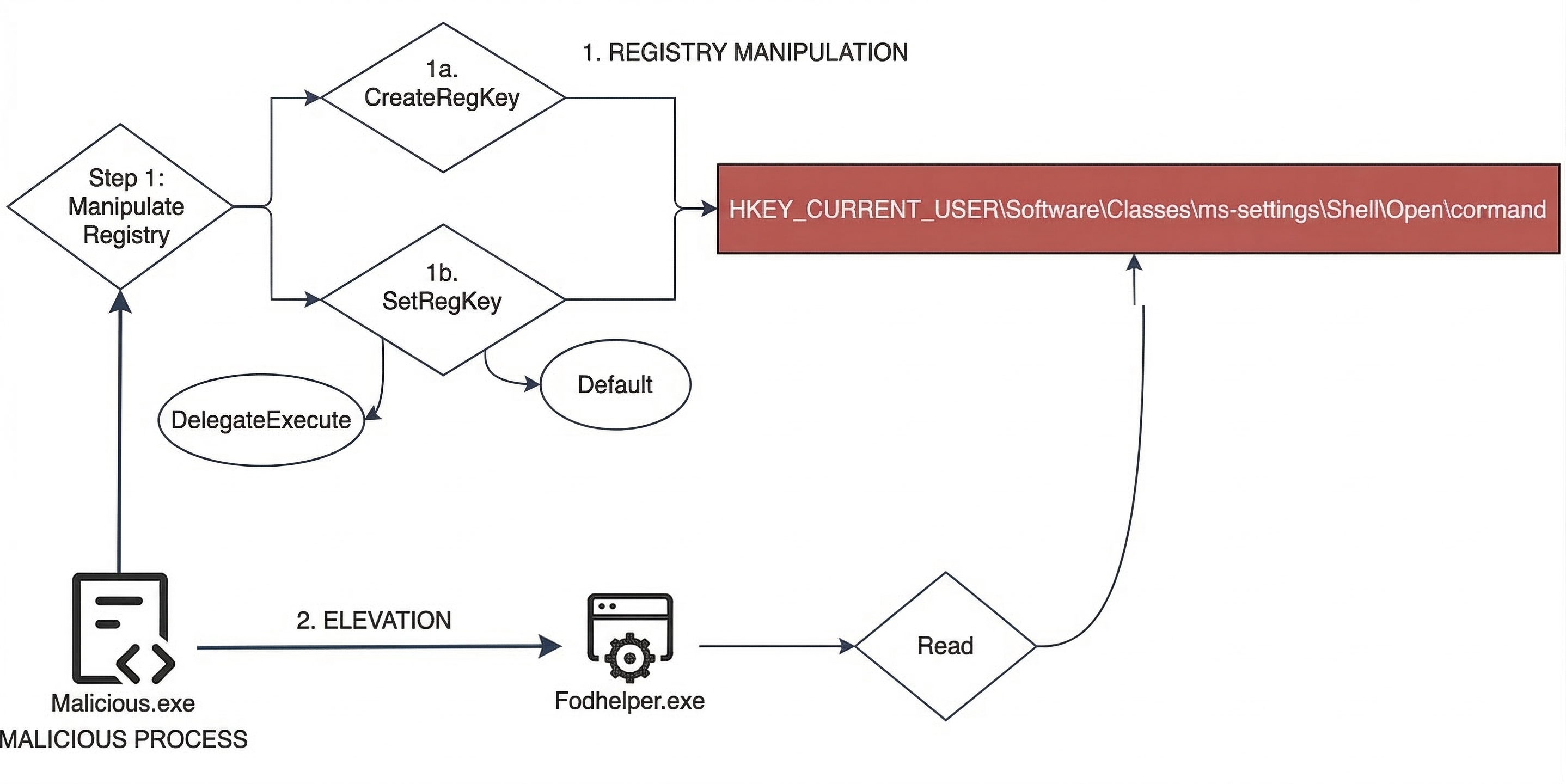
As fodhelper executes, Windows will automatically evelate it to High integrity. This process might strive to open the ‘ms-seetings’ protocol with default handler. Threat actor just need to modify registry key HKCU\Software\Classes\ms-settings\shell\open\command in order to point to the arbitrary command :
reg add HKCU\Software\Classes\ms-settings\shell\open\command /f /ve /t REG_SZ /d "cmd.exe"
reg add HKCU\Software\Classes\ms-settings\shell\open\command /v DelegateExecute /f
start fodhelper.exe
Pseodu Code
    BEGIN
    DEFINE registryPath = "Software\Classes\ms-settings\Shell\Open\command"
    DEFINE command = "cmd /c start cmd.exe"
    DEFINE delegateExecute = ""

    // Open or create the registry key under the current user
    OPEN registryKey AT registryPath WITH write_permissions

    // Write values into the registry
    SET registryKey["(default)"] = command
    SET registryKey["DelegateExecute"] = delegateExecute

    // Close the registry key
    CLOSE registryKey

    // Prepare to execute a system program with elevated privilege
    INITIALIZE shellExecuteInfo
        shellExecuteInfo.action = "run as administrator"
        shellExecuteInfo.targetFile = "C:\Windows\System32\fodhelper.exe"
        shellExecuteInfo.displayMode = normal_window
    END INITIALIZE

    // Execute the prepared system command
    EXECUTE shellExecuteInfo
END
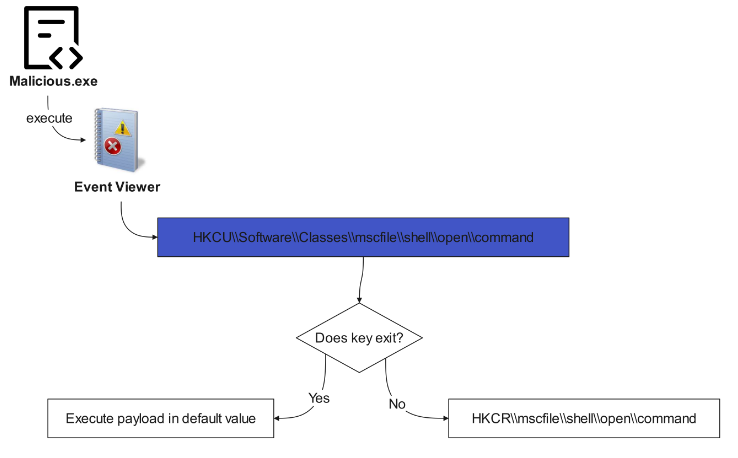
Eventvwr.exe Bypass: Similarly, eventvwr.exe queries the key HKCU\Software\Classes\mscfile\shell\open\command before calling fallback to HKCR, allows attackers to inject payload.
 Sdclt.exe IsolatedCommand: This method invokes manipulating
 IsolatedCommand registry key associated with sdclt.exe (System Restore) in order to execute abitary command with High Priviledge.
Environment Variable Manipulation: byeintegrity5 bypass takes advantage of environment variable %windir% by modifying HKCU\Environment\windir to redirect scheduled task CDSSync to load DLL from the directory which the attacker controls. Specifically, this technique could still work even if the UAC is set to Always Notify.
Elevated COM Interface
This way involves finding out COM interface which can execute process with elevated priviledge (e.x wrapper CreateProcess/ShellExec), in order to call a process from Medium integrity.
| COM Interface | CLSID | Malware abuse |
|---|---|---|
| ICMLuaUtil (CMSTPLUA) | {3E5FC7F9-9A51-4367-9063-A120244FBEC7} | DarkSide, LockBit, TrickBot |
| IColorDataProxy | — | By UACME executes |
| IEditionUpgradeManager | — | by UACME execute |
| IFileOperation | CLSID_FileOperation | Vault 7 disclosure |
Behaviorally, serveral COM interface executes on dllhost.exe (COM Surrogate) with command line which involves classId of COM object, creates child process with High integrity.
Trusted Path Collision (Mock Trusted Directories)
This technique exploits how Windows resolves path normalization within the process authenticate UAC:
- Create folder in
C:\Windows \System32\. - Set the programs to have manifest auto-elevate (ví dụ
BitLockerWizardElev.exe) and malicious DLL into the folder. - Because of path normalization, Windows can treat that this directory as a truth folder, bypass checking UAC. This technique is litteraly presented at HITCON 2019 (“Duplicate Paths Attack: Get Elevated Privilege from Forged Identities”) and SITCON 2020.
CMSTP (Connection Manager Profile Installer)
cmstp.exe is able to execute command string with elevated permission through COM interface ICMLuaUtil. By faking to look like explorer.exe, attacker calls ShellExec to this interface in order to execute abitary command with the highest priviledge.
Token Manipulation
The engineering group manipulates access token or token attribute to get the elevated permission. UACME launched a lot of method in this group, including absuse UIAccess token, DebugObject, and SSPI Datagram.
Some tools and malware abuse UAC Bypass
MITRE ATT&CK framework follows this techniques which named T1548.002 — Bypass User Account Control. A lot of popular malware have intergated bypass UAC ability like :
| Malware | UAC Bypass |
|---|---|
| DarkSide, LockBit, TrickBot | ICMLuaUtil Elevated COM Interface |
| Glupteba | FodHelper Execution Hijack, DiskCleanup Task Hijack |
| Remcos RAT | Windows Directory Masquerading |
| Cobalt Strike | combination of multiple techniques |
| BlackCat (ALPHV) | Bypass UAC to escalate privileges |
| Raspberry Robin | abuse fodhelper.exe to run elevated process |
| Quasar RAT | ComputerDefaults Execution Hijack |
| RedLine Stealer | DiskCleanup Scheduled Task Hijack |
After bypassing UAC successfully, some normal actions include : adding AV exclusion, writing down protected registry key (HKLM), and disable system recorvery.
Besides, UACME is the best popular tool, which contains more 80 bypassing method with akagi64.exe executable . The simple way is to use command line: akagi64.exe [method_number] [optional_command].
You can also read some techniques here :
Elastic: Exploring Windows UAC Bypasses: Techniques and Detection Strategies
MITRE: Abuse Elevation Control Mechanism: Bypass User Account Control
Detection Evasion
Adversary can abuse some techique to make bypass UAC more difficult to detect as :
- Registry Key Rename: Rename registry key after interacting to break detection logic based on particular path.
- Registry Symbolic Link: Create symbolic link in registry to redirect, avoid monitoring directly on
ms-settingsorshell\open\command. - CurVer Subkey: UACME v3.5.7 add more technique using subkey CurVer to redirect shell default handler, bypass detection in order to figure out constant registry path/value.
- Directory Rename: Rename folder after setting DLL to avoid file path monitoring.
Detection
Token Security Attributes
Elastic Security detected that could abuse token security attributes of process to determine processes ran through auto-elevated application:
LUA://HdAutoAp— Process is auto-elevated application.LUA://DecHdAutoAp— Process is a child (descendant) of auto-elevated application.
DecHdAutoAp attribute is specially useful because it allows to detect UAC bypass without knowing particular techniques — just need to find supicious process (as cmd.exe, powershell.exe, rundll32.exe) run on High/System integrity and this attribute.
Monitor Event
Through MITRE ATT&CK Detection Strategy DET0388, need to monitor chain of behaviors multiple occasions incluce:
- Familiar auto-elevated binary (eventvwr.exe, sdclt.exe, fodhelper.exe) run abnormal child process.
- Modifing registry is not allowed at some key relating to UAC.
- Process executes with elevated permission but there is no standard parent-child relation.
- Create auto-elevated COM object or interact with
IsolatedCommandregistry entries.
Mitigation
UAC Configuration
With MITRE ATT&CK Mitigation M1052, some method contain:
- Set up UAC at Always Notify: Install Group Policy
User Account Control: Run all administrators in Admin Approval Modeto set Enabled. - Require Password: Configure
User Account Control: Behavior of the elevation promptwhich need credential instead of validating. - Enable Admin Approval Mode for built-in Administrator: set
FilterAdministratorToken=dword:00000001. - Secure Desktop: enable
User Account Control: Switch to the secure desktop when prompting for elevation. - Block untruth Application: Configure
User Account Control: Only elevate executables that are signed and validated.